Apparel Color Switch: The Easy Way to Change Clothing Colors

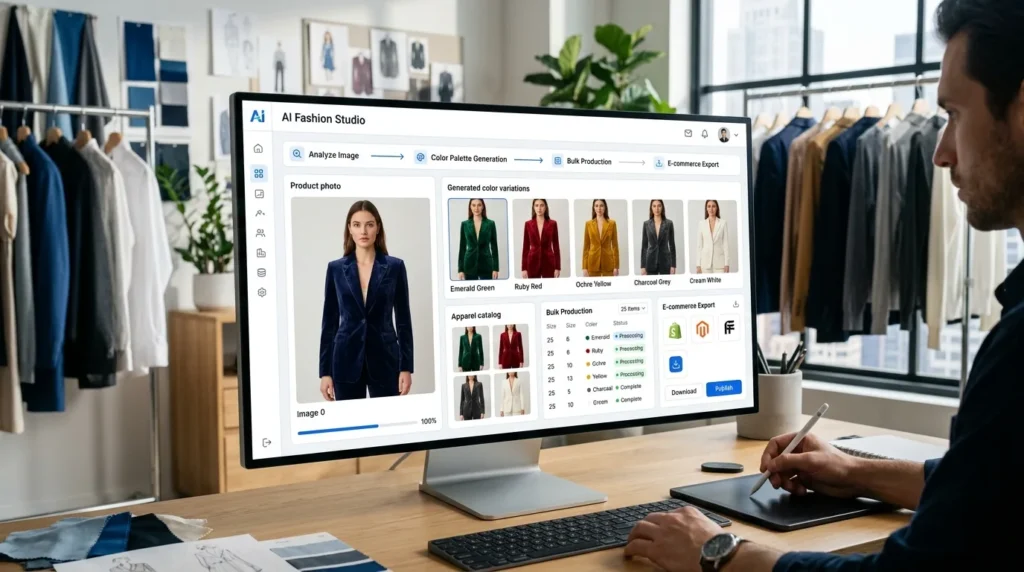
Apparel Color Switch helps fashion brands create multiple clothing color variations from a single photoshoot using artificial intelligence. Instead of photographing every color separately, AI transforms one apparel image into realistic color variants while preserving fabric texture, lighting, model pose, and overall styling.
Key Takeaways
- Create multiple clothing colors from one photoshoot.
- Maintain consistent fashion photography across every color variant.
- Reduce production costs and photoshoot time.
- Generate realistic fabric colors using AI.
- Scale fashion catalogs without repeated photography.
Why Fashion Brands Need Faster Color Variations
Modern fashion shoppers expect choices. A single apparel design is often available in multiple colors, including:
- Black
- White
- Blue
- Red
- Green
- Beige
- Seasonal collections
Showing every available color improves customer confidence and increases purchase decisions. However, traditional fashion photography makes this process expensive.
Every additional color usually requires:
- Another outfit
- Another photoshoot
- Additional editing
- More production time
- Higher model costs
- Larger photography budgets
As catalogs grow, these costs increase dramatically.
The Challenges of Traditional Color Photography
Fashion brands frequently introduce products in multiple color options.
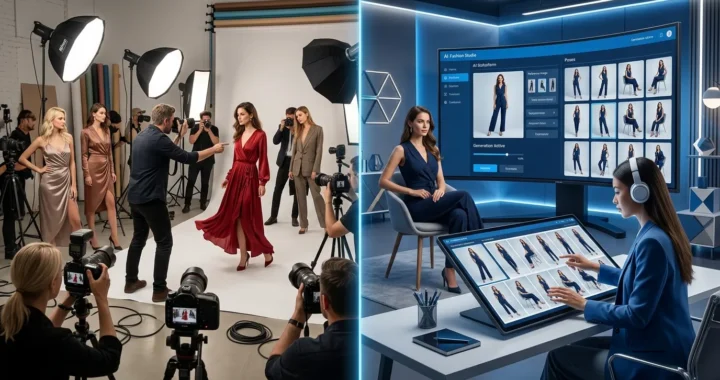
Traditionally, each color must be photographed separately.
This creates several problems:
- Higher production costs
- Longer photography sessions
- Inconsistent lighting
- Slight pose differences
- Styling variations
- Delayed product launches
Even when photographers follow the same creative brief, small differences between photoshoots make color comparisons more difficult for customers.
What Is Apparel Color Switch?
Apparel Color Switch is an AI-powered feature inside LovPics AI Fashion Studio that transforms clothing colors while preserving every important visual detail. Upload one image showing a garment in any color.
Artificial intelligence automatically generates realistic color variations while maintaining:
- Fabric texture
- Wrinkles
- Stitching
- Shadows
- Lighting
- Model pose
- Background
- Styling
The result is an entire collection of professional fashion images generated from one original photograph.
Why Apparel Color Switch Changes Fashion Photography
Artificial intelligence removes one of the biggest production bottlenecks in fashion ecommerce.
Instead of organizing multiple photoshoots for different color options, brands can generate complete product catalogs from one image.
Key benefits include:
- Faster product launches
- Lower photography costs
- Unlimited color options
- Consistent catalog photography
- Better customer experience
- Improved product comparison
- Faster campaign creation
- Scalable fashion content production
Brands can now showcase every available color without multiplying production costs.
Introducing the COLORS Framework™
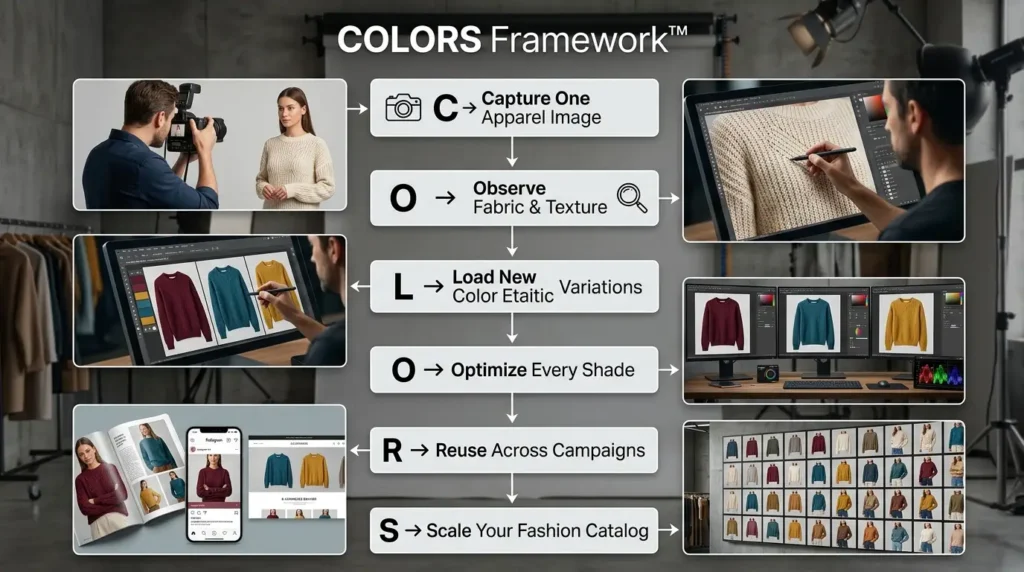
At LovPics, we believe one great fashion photo should power your entire product catalog. The COLORS Framework™ helps brands create realistic color variations while maintaining visual consistency.
C – Capture One Apparel Image
Begin with a professional fashion image showing your apparel in one color.
O – Observe Fabric & Texture
AI analyzes garment materials, lighting, shadows, folds, and stitching to understand how colors should behave.
L – Load New Color Variations
Generate multiple realistic color options using predefined palettes or your own brand colors.
O – Optimize Every Shade
Artificial intelligence adjusts lighting, reflections, saturation, and contrast so every color appears natural.
R – Reuse Across Campaigns
Use every generated color variation across ecommerce stores, advertising campaigns, social media, and catalogs.
S – Scale Your Fashion Catalog
Produce complete fashion collections from a single photoshoot, dramatically reducing production time and costs.
How Apparel Color Switch Works
The workflow is simple. Upload a fashion image into LovPics AI Fashion Studio. Artificial intelligence identifies the apparel and understands:
- Fabric type
- Current garment color
- Material texture
- Lighting conditions
- Shadow placement
- Garment boundaries
- Model positioning
- Overall composition
Next, choose your preferred colors.
You can:
- Select predefined colors
- Enter HEX values
- Use RGB color codes
- Match your brand palette
Within minutes, LovPics generates multiple realistic clothing color variations that maintain the same high-quality photography throughout every version.
Why AI Makes Fashion Catalogs More Scalable
Traditional fashion photography scales by increasing production. AI scales by increasing creativity. Instead of repeating the same photoshoot for every color variation, brands photograph each design only once and allow AI to generate the remaining variants.
This approach enables fashion businesses to launch larger collections, introduce seasonal color options faster, test customer preferences, and maintain perfectly consistent product catalogs.
As fashion ecommerce becomes increasingly competitive, Apparel Color Switch provides brands with a faster, smarter, and more cost-effective way to showcase every available color while delivering a better shopping experience.
Read More Articles On AI Fashion & Apparel
Real-World Applications of Apparel Color Switch
Fashion brands are expected to offer more choices than ever before. Customers want to see every available color before making a purchase, but photographing each color separately increases production costs and delays product launches. Apparel Color Switch solves this challenge by generating realistic clothing color variations from a single photoshoot.
Apparel Color Switch for Fashion Brands
Fashion collections often include multiple color options for the same garment.
Apparel Color Switch helps brands generate:
- Seasonal color collections
- Limited-edition colorways
- Product launch campaigns
- Fashion lookbooks
- Ecommerce catalogs
- Promotional campaigns
Every color variation maintains identical lighting, styling, and model positioning.
Apparel Color Switch for Ecommerce Stores
Online shoppers prefer seeing products in every available color before purchasing.
Apparel Color Switch enables ecommerce businesses to create:
- Product detail pages
- Color swatches with realistic previews
- Collection pages
- Marketplace listings
- Product comparison galleries
- Mobile-friendly product catalogs
This improves customer confidence while reducing uncertainty about color selection.
Apparel Color Switch for Apparel Manufacturers
Manufacturers frequently introduce products in multiple colors before deciding which variants to produce.
Apparel Color Switch allows teams to:
- Visualize new color combinations
- Test seasonal collections
- Present samples to retailers
- Evaluate customer preferences
- Reduce physical sampling costs
This speeds up product development while minimizing unnecessary production.
Apparel Color Switch for Fashion Marketing Teams
Marketing campaigns require fresh creative assets throughout the year.
Apparel Color Switch helps generate:
- Social media creatives
- Website banners
- Email campaigns
- Collection launch graphics
- Digital advertisements
- Promotional landing pages
Every campaign can showcase different color options without scheduling additional photoshoots.
Apparel Color Switch for Fashion Agencies
Creative agencies managing multiple fashion brands need scalable production workflows. Apparel Color Switch enables agencies to produce complete fashion catalogs while maintaining consistent visual quality for every client.
Apparel Color Switch Across the LovPics Workflow
The true value of Apparel Color Switch comes from its integration with the complete LovPics AI Fashion Studio. Instead of functioning as a standalone color-changing tool, it connects seamlessly with other AI-powered fashion features.
Apparel Color Switch integrates with:
- AI Fashion Studio
- AI Creative Director
- Multi-Pose Generation
- AI Photoshoot
- Smart Image Editing
- Reusable Templates
- AI Retouch
- AI Product Photography
- AI Media Manager
- Bulk Image Export
Together, these tools help fashion brands build complete ecommerce catalogs and marketing campaigns from a single apparel image.
Common Mistakes When Creating Clothing Color Variations
Photographing Every Color Separately
Many brands organize separate photoshoots for every garment color. AI allows businesses to create realistic color variations from one professionally photographed image, saving significant time and cost.
Inconsistent Product Photography
Different photography sessions often produce:
- Different lighting
- Different poses
- Different shadows
- Different styling
These inconsistencies make product catalogs appear less professional. Apparel Color Switch ensures every color variation remains visually identical except for the garment color.
Offering Limited Color Choices
Some businesses avoid introducing additional colors because photography costs become too high.
AI removes this limitation, allowing brands to showcase complete product collections without increasing production budgets.
Ignoring Brand Colors
Fashion brands often have signature seasonal or brand-specific colors.
Apparel Color Switch allows businesses to generate variations using predefined palettes, HEX values, RGB codes, or exact brand colors for complete consistency.
Delaying Product Launches
Waiting for every product color to be photographed slows inventory launches.
AI enables brands to launch complete collections much faster while producing professional-quality visuals immediately.
The Future of AI Fashion Color Management
Artificial intelligence is transforming how fashion brands create and manage product catalogs.
Future AI capabilities are expected to include:
- AI-generated seasonal color forecasting
- Intelligent trend-based color recommendations
- Personalized color previews
- Interactive virtual wardrobes
- Automated collection generation
- Real-time apparel customization
Fashion brands that embrace AI-powered color generation today will be able to respond more quickly to trends, launch collections faster, and provide richer shopping experiences.
Comparison Table
Traditional Color Photoshoots vs Apparel Color Switch
| Feature | Traditional Photoshoots | Apparel Color Switch |
|---|---|---|
| One Photoshoot per Color | Yes | No |
| Production Speed | Slow | Fast |
| Color Consistency | Varies | Excellent |
| Photography Cost | High | Lower |
| Product Launch Speed | Slower | Faster |
| Unlimited Color Variations | No | Yes |
| Catalog Consistency | Manual | AI Assisted |
| Best For | Individual Photoshoots | Scalable Fashion Catalogs |
Decision Matrix
Who Should Use Apparel Color Switch?
| Business Type | Recommended |
|---|---|
| Fashion Brands | ⭐⭐⭐⭐⭐ |
| Apparel Manufacturers | ⭐⭐⭐⭐⭐ |
| Ecommerce Stores | ⭐⭐⭐⭐⭐ |
| D2C Fashion Brands | ⭐⭐⭐⭐⭐ |
| Fashion Agencies | ⭐⭐⭐⭐⭐ |
| Boutique Brands | ⭐⭐⭐⭐ |
| Clothing Designers | ⭐⭐⭐⭐ |
| Marketplace Sellers | ⭐⭐⭐⭐ |
Frequently Asked Questions
What is Apparel Color Switch?
Apparel Color Switch is an AI-powered feature within LovPics AI Fashion Studio that changes clothing colors while preserving realistic fabric textures, lighting, shadows, and styling from the original image.
How many color variations can I generate?
You can create virtually unlimited color variations from a single source image. Generate multiple colors for seasonal collections, product launches, or customer preferences without organizing additional photoshoots.
Will the new colors look realistic?
Yes. LovPics AI understands fabric textures, material properties, shadows, and lighting conditions, ensuring every generated color appears natural and professionally photographed.
Can I use my own brand colors?
Absolutely. You can choose predefined color palettes or specify custom HEX, RGB, or brand color values to match your exact product offerings.
Does Apparel Color Switch work with patterned fabrics?
Yes. The AI preserves patterns, prints, textures, stitching, and garment details while intelligently changing the base fabric color, ensuring realistic results.
Can I combine Apparel Color Switch with other LovPics features?
Yes. Apparel Color Switch integrates seamlessly with Multi-Pose Generation, AI Creative Director, AI Photoshoot, Smart Image Editing, Reusable Templates, AI Retouch, and Bulk Image Export to create complete fashion catalogs from a single photoshoot.
Why should I use LovPics for Apparel Color Switch?
LovPics combines Apparel Color Switch, AI Fashion Studio, AI Creative Director, Multi-Pose Generation, AI Photoshoot, Smart Image Editing, AI Retouch, Reusable Templates, and Bulk Image Export into one AI-powered platform. It enables fashion brands to create realistic clothing color variations, maintain consistent photography, reduce production costs, and launch complete collections significantly faster than traditional workflows.
Conclusion
Offering multiple color choices is no longer a luxury; it’s an expectation. Customers want to compare every available option before making a purchase, but traditional photography makes showcasing every color expensive and time-consuming.
Apparel Color Switch transforms this process by allowing fashion brands to create realistic clothing color variations from a single photoshoot. By preserving fabric texture, lighting, styling, and overall visual quality, LovPics enables businesses to expand product catalogs, accelerate collection launches, and maintain complete visual consistency while dramatically reducing production costs.
As AI continues to reshape fashion ecommerce, brands that adopt intelligent color generation will be able to respond faster to market trends, showcase more product options, and deliver a better shopping experience without increasing creative overhead.