Bulk Image Export: The Smart Way to Manage Fashion Images


Bulk Image Export has become an essential capability for modern fashion teams because creating AI generated images is no longer the slowest part of content production. Today’s challenge is organizing, exporting, and deploying hundreds of approved assets quickly across ecommerce stores, marketplaces, advertising platforms, and social media channels. By streamlining this process, Bulk Image Export helps creative teams spend less time managing files and more time launching campaigns.
Key Takeaways
- AI has dramatically accelerated fashion content production.
- Managing large image libraries has become a significant operational challenge.
- Bulk Image Export reduces repetitive manual work and improves campaign efficiency.
- Organized export workflows help creative, ecommerce, and marketing teams collaborate more effectively.
- Faster asset deployment allows brands to respond quickly to new collections, promotions, and seasonal campaigns.
Fashion Content Production Has Entered a New Era
Fashion brands have never produced as much visual content as they do today. Every collection launch requires product photography, on-model images, lifestyle visuals, advertising creatives, email banners, marketplace assets, and social media content. As customer expectations continue to grow, brands must publish more images across more channels than ever before.
Artificial intelligence has fundamentally changed how this content is created. Tasks that once required photographers, studios, stylists, and weeks of production can now be completed in hours. Teams can generate hundreds of high-quality fashion images in a single day while maintaining visual consistency across entire collections.
This rapid improvement has solved one major challenge, but it has also revealed another. After generating hundreds of approved images, teams still need to organize, export, share, and publish every asset efficiently. That is where Bulk Image Export becomes an important part of the workflow.
Why Bulk Image Export Matters More Than Ever
Many businesses assume faster image generation automatically creates faster marketing campaigns. In reality, campaign production involves far more than generating visuals. Every approved image must move through review, organization, distribution, and publishing before customers ever see it.
Consider a typical seasonal collection launch.
A creative team may generate:
- Product images
- AI fashion model variations
- Lifestyle photography
- Marketplace versions
- Promotional banners
- Social media creatives
- Regional campaign assets
By the time approvals are complete, hundreds of production-ready files are waiting to be delivered.
Downloading every image individually may seem manageable for a small campaign. However, as collections grow larger and marketing channels multiply, manual exports quickly become one of the slowest stages in the entire production process.
The Hidden Cost of Manual Image Management
Most operational bottlenecks do not appear suddenly. They develop gradually as businesses grow.
A team that once managed fifty product images per month may soon manage several thousand. Without changing workflows, every new campaign introduces additional administrative work that quietly consumes valuable production time.
Creative professionals often find themselves performing repetitive tasks such as downloading files one by one, renaming assets, creating folders, organizing variations, and preparing packages for different departments.
Although each activity requires only a few minutes, the combined effect becomes substantial across dozens of campaigns throughout the year.
The real cost is not simply the time spent exporting files. It is the delay created between content approval and campaign launch.
How Fashion Content Workflows Become Bottlenecks
- Fashion marketing depends on speed.
- Collections launch according to seasonal calendars.
- Promotional campaigns follow fixed schedules.
- Marketplace updates often have strict deadlines.
- Every delay inside the content workflow affects multiple departments simultaneously.
- Marketing teams cannot publish campaigns until approved assets are available.
- Ecommerce managers cannot update product pages without finalized images.
- Advertising teams cannot prepare creatives until export packages are complete.
- Merchandising teams depend on consistent image libraries to maintain accurate product presentations.
As content production accelerates through artificial intelligence, these downstream activities become increasingly important. Businesses that fail to optimize operational workflows often discover that faster image generation simply shifts the bottleneck elsewhere.
Introducing the FLOW Framework™
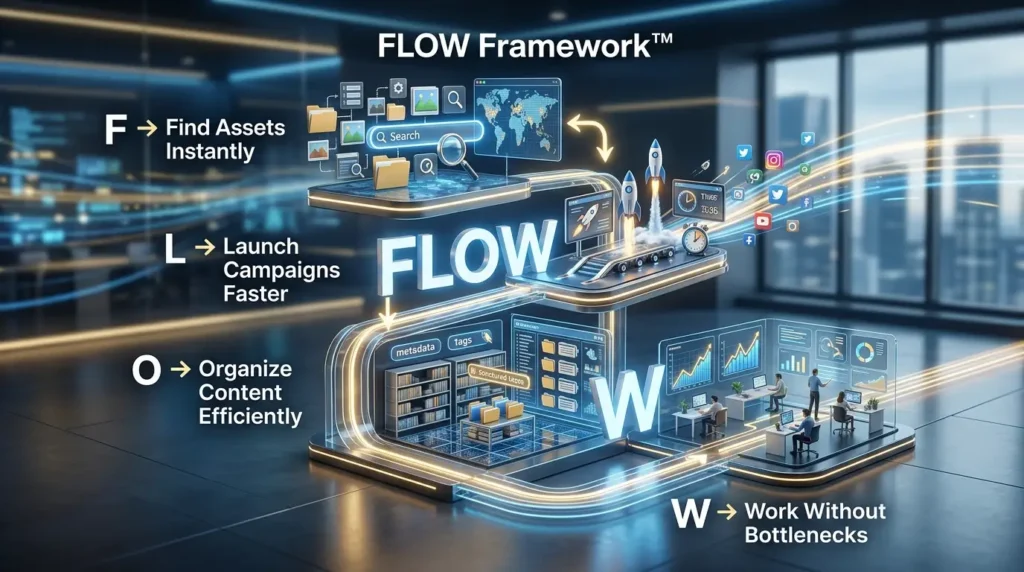
At LovPics, we believe efficient content production extends beyond image generation. Successful fashion brands optimize every stage between creating visual assets and publishing them across customer channels. We summarize this approach through the FLOW Framework™.
F – Find Assets Instantly
Well-organized image libraries allow every department to locate approved content quickly without searching through multiple folders or outdated file versions. Easy access improves collaboration and reduces unnecessary delays.
L – Launch Campaigns Faster
Efficient export workflows help marketing teams move directly from creative approval to campaign deployment. Faster launches create greater flexibility during seasonal promotions and product releases.
O – Organize Content Efficiently
Large fashion catalogs require structured asset management. Keeping products, poses, color variations, and campaign versions together reduces confusion while improving operational consistency.
W – Work Without Workflow Bottlenecks
The ultimate objective is simple. Creative assets should move smoothly from generation to publication without unnecessary interruptions. Every improvement in workflow efficiency allows teams to focus more on marketing and less on administration.
Bulk Image Export Supports Modern Fashion Operations
The value of Bulk Image Export extends beyond downloading multiple files simultaneously. It creates a structured workflow that helps creative teams manage increasingly complex content libraries with greater efficiency.
Instead of exporting images individually, entire collections remain grouped together according to products, campaigns, model variations, or marketing channels. This structured approach reduces manual effort while making collaboration between creative, ecommerce, and marketing teams significantly easier.
As fashion businesses continue increasing the volume of AI generated content, efficient export workflows become an important competitive advantage rather than a simple convenience.
Why Agencies Feel the Challenge First
Creative agencies often experience workflow bottlenecks before in-house marketing teams because they manage multiple clients, campaigns, and approval processes simultaneously. Every client requires different asset structures, naming conventions, delivery schedules, and campaign formats.
An agency producing thousands of fashion images every month cannot rely on repetitive manual exports without affecting productivity. Even small improvements achieved through Bulk Image Export become significant when repeated across hundreds of campaigns each year.
For agencies, operational efficiency directly influences profitability, delivery speed, and client satisfaction.
Real-World Use Cases for Bulk Image Export
Fashion businesses rarely create content for a single destination. A single product collection often supports ecommerce websites, social media campaigns, online marketplaces, digital advertisements, email marketing, and printed promotional materials. Every platform requires different image sizes, formats, and creative variations. Bulk Image Export simplifies this process by allowing teams to prepare complete asset libraries instead of repeatedly downloading files for every individual campaign.
Collection Launches
Launching a new collection involves much more than publishing product pages. Marketing teams need coordinated assets for websites, lookbooks, paid advertising, influencer collaborations, and social media announcements. Bulk Image Export allows entire collections to be downloaded together while preserving logical organization across products, poses, backgrounds, and variations. This reduces preparation time and helps every department begin working immediately after creative approval.
Ecommerce Product Catalogs
Modern ecommerce stores frequently add new products, update seasonal collections, and refresh existing product pages. Exporting images one by one creates unnecessary delays, especially when hundreds of products are involved. Bulk Image Export enables ecommerce managers to prepare complete product image libraries that are ready for upload, making catalog updates faster and more consistent.
Marketplace Listings
Selling through multiple marketplaces often requires different product image packages for each platform. Fashion businesses may need square images, white background photos, lifestyle visuals, and alternate product angles for every listing. Bulk Image Export keeps these variations together so marketplace teams can publish products efficiently without searching through large collections of individual files.
Read More Articles On Workflow & Productivity
Seasonal Campaigns
Seasonal promotions move quickly, and campaign deadlines leave little room for manual work. Marketing teams often require hundreds of approved visuals across email campaigns, website banners, paid advertisements, and social media posts within a short period. Bulk Image Export allows complete campaign assets to be prepared in a single workflow, helping brands respond faster to seasonal opportunities.
Creative Agencies
Agencies typically manage multiple fashion brands simultaneously. Every client has unique naming conventions, delivery requirements, and approval processes. Bulk Image Export simplifies client deliveries by enabling agencies to package complete project assets in a consistent, organized manner. This improves delivery speed while reducing the possibility of missing or incorrectly grouped files.
Why Organization Is Just as Important as Image Generation
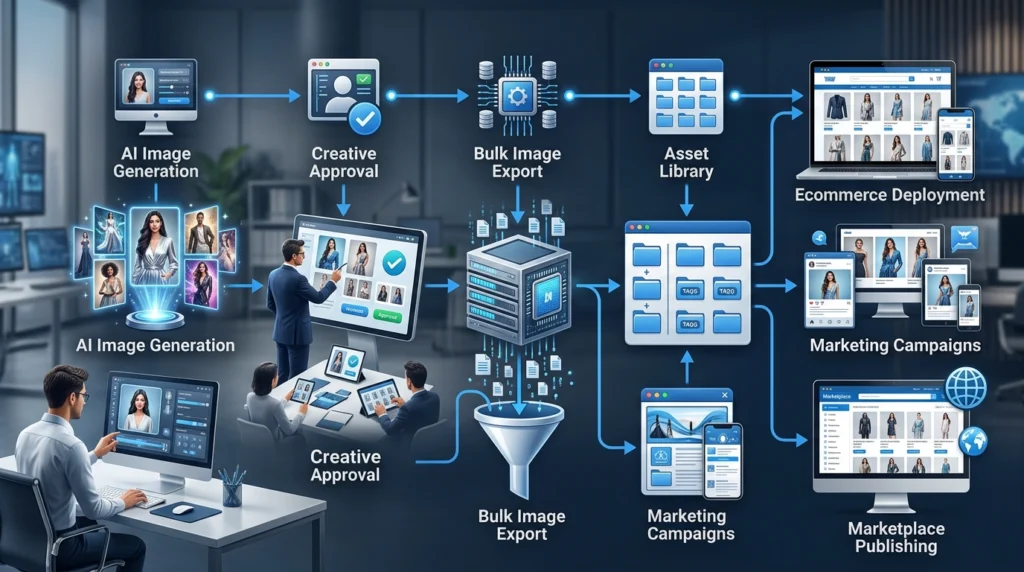
Artificial intelligence has dramatically improved the speed of image creation, but content production does not end when an image is generated. Every approved asset must still move through review, distribution, publishing, and long-term storage before it delivers value to the business.
Successful fashion brands understand that efficient organization is not administrative work. It is an important part of the marketing process. Teams that can locate, export, and deploy assets quickly spend more time launching campaigns and less time managing folders, filenames, and downloads.
As image libraries continue growing, organized workflows become increasingly valuable. A structured content library allows creative teams to collaborate more effectively while reducing confusion across marketing, ecommerce, merchandising, and external partners.
Bulk Image Export Across the AI Fashion Workflow
The greatest productivity gains occur when every stage of content production connects naturally. Teams should not need separate workflows for creating, editing, organizing, and exporting assets. Instead, every stage should build upon the previous one, allowing content to move smoothly from concept to publication.
Bulk Image Export integrates naturally with other LovPics capabilities, including:
- AI Fashion Models
- Multi-Pose Generation
- Apparel Color Switch
- AI Concept Generator
- Smart Image Editing
- Ecommerce Image Packs
This connected workflow allows fashion businesses to create complete marketing assets without introducing unnecessary interruptions between production stages.
Common Mistakes Fashion Teams Make
Treating Asset Management as an Afterthought
Many creative teams devote significant attention to generating beautiful visuals while giving far less consideration to how those assets will be organized after approval. As content libraries expand, this imbalance creates unnecessary confusion that slows campaign execution.
Waiting Until Launch Day
Some businesses postpone exporting and organizing assets until campaigns are ready to go live. This approach creates avoidable pressure because teams must complete administrative work while also meeting publication deadlines. Preparing export packages earlier keeps launches running smoothly.
Using Inconsistent File Structures
As organizations grow, inconsistent naming conventions become increasingly difficult to manage. Different folder structures, duplicated filenames, and inconsistent campaign organization make it harder for teams to locate the correct assets when deadlines are approaching.
Creating More Content Than Teams Can Deploy
Artificial intelligence makes it easy to generate hundreds of image variations. However, producing more content than teams can realistically organize and publish creates a new operational bottleneck. Successful businesses balance production speed with deployment efficiency.
The Future of Fashion Content Operations
Fashion content production will continue becoming faster as artificial intelligence evolves. Brands will create more product variations, serve more international markets, and publish across an increasing number of digital channels. This growth will place even greater importance on efficient content operations.
Competitive advantage will no longer depend solely on creating exceptional visuals. It will also depend on how quickly approved assets move from production into customer-facing campaigns. Businesses that streamline export workflows today will be better prepared to manage the larger content libraries of tomorrow.
Bulk Image Export represents an important step toward that future. Instead of allowing operational tasks to slow creative momentum, fashion teams can focus on developing campaigns, reaching new audiences, and growing their business while routine export activities happen more efficiently.
Frequently Asked Questions
What is Bulk Image Export?
Bulk Image Export allows users to download multiple approved images at the same time instead of exporting files individually. This makes it easier to prepare complete campaign asset libraries for marketing, ecommerce, and marketplace publishing.
Why is Bulk Image Export important for fashion brands?
Fashion brands generate large numbers of AI powered images for every collection. Bulk Image Export reduces manual work by helping teams organize and download complete image sets efficiently, improving overall workflow speed.
Does Bulk Image Export work with AI Fashion Models?
Yes. Bulk Image Export works seamlessly with AI Fashion Models and other LovPics tools, allowing complete collections of generated images to be exported together.
Can I export multiple image variations at once?
Yes. Product variations, model poses, background options, campaign assets, and seasonal collections can all be exported together, making large projects easier to manage.
Does Bulk Image Export reduce image quality?
No. Exported files retain their original quality, ensuring they remain suitable for ecommerce websites, marketplaces, advertising campaigns, and other marketing channels.
Is Bulk Image Export useful for creative agencies?
Absolutely. Agencies managing multiple clients benefit from faster project delivery, better organization, and consistent asset management across every campaign.
Conclusion
Artificial intelligence has solved one of the fashion industry’s biggest challenges by making professional content creation dramatically faster. However, increasing production speed has revealed another challenge that many businesses did not expect. Organizing, exporting, and deploying thousands of approved assets has become the new operational bottleneck.
Bulk Image Export helps remove that bottleneck by simplifying one of the most repetitive stages of the content lifecycle. Instead of spending valuable time managing files manually, fashion teams can prepare complete collections, organize campaign assets, and move content into production much more efficiently.
As fashion marketing continues evolving, businesses that combine fast content generation with efficient content operations will be better positioned to launch campaigns quickly, respond to market opportunities, and deliver consistent experiences across every customer touchpoint. Workflow efficiency is no longer simply an operational improvement. It is becoming a competitive advantage.