Multi-Color Variant Generator: Create Product Color Variations Instantly
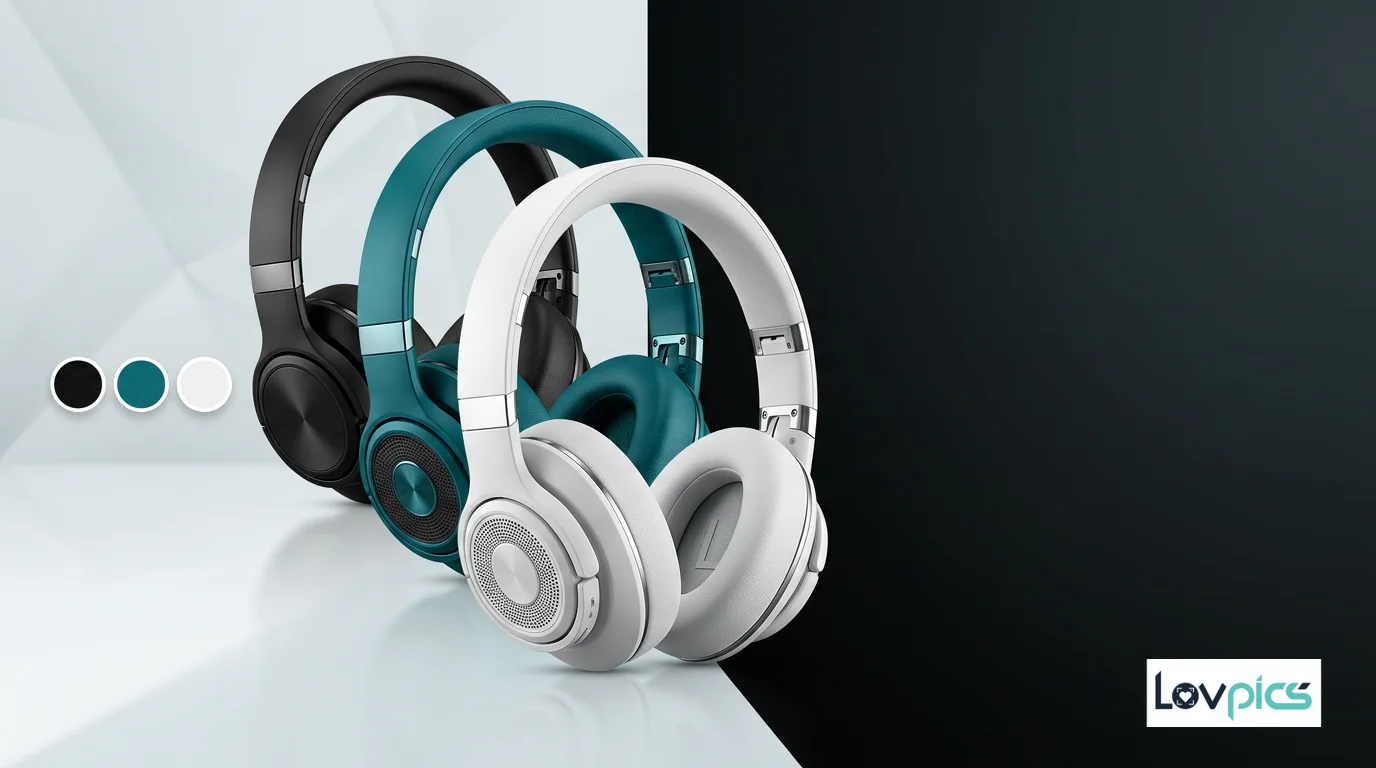
Product design often requires exploring color options. Whether testing market preferences, creating catalog variety, or matching brand palettes, color variants are essential. Traditional workflows require redesigning products for each color, reshooting images, or manually editing colors—all time-consuming and expensive. Multi-Color Variant Generator changes this entirely, allowing you to generate accurate, realistic color variations instantly from a single product design.
The Color Variant Challenge
Every product designer knows the challenge of color exploration. Testing different color options requires creating multiple design iterations, which multiplies design time and costs. For brands offering products in multiple colors, this overhead becomes significant, especially when colors need to be tested before production.
Even worse, color variants often need to be presented visually—in catalogs, on websites, in marketing materials. This means creating visuals for each color variant, further multiplying production overhead. Multi-Color Variant Generator solves this by generating color variants instantly from a single design.
What Is Multi-Color Variant Generator?
Multi-Color Variant Generator is an AI-powered tool within the LovPics AI Product Design platform that transforms product designs into multiple color variations using AI. Upload a product design in one color, specify the colors you want to explore, and the AI generates accurate, realistic color variants instantly.
The technology understands material properties, how colors interact with different surfaces, and how lighting affects color appearance. This means color changes look natural and realistic, with accurate shadows, appropriate saturation, and proper material appearance. The result is professional color variants that accurately represent how products will look in different colors.
How Multi-Color Variant Generator Works
The process begins when you upload a product design image. This can be a product mockup, design file, or product photograph. The AI analyzes the image, understanding the product structure, materials, and current color.
Next, you specify the colors you want to generate. You can choose from predefined color palettes, input specific color codes, or select colors that match your brand offerings. The AI then generates multiple variations, each showing your product in a different color while maintaining the exact same design, lighting, and composition.
What makes Multi-Color Variant Generator particularly powerful is its ability to maintain realism across different colors. Dark colors show appropriate depth, light colors maintain brightness without washing out, and material textures are preserved regardless of color. This attention to detail ensures that every color variant looks authentic and professional.
Benefits for Product Designers
The advantages of Multi-Color Variant Generator extend far beyond time savings. For designers, exploring color options becomes instant. Test multiple color palettes, compare variations, and make informed decisions about color choices—all without creating multiple design iterations.
For brands managing product catalogs, Multi-Color Variant Generator dramatically accelerates catalog creation. Instead of designing and visualizing each color variant separately, you can generate all color options instantly. This efficiency allows you to offer more color variety without proportionally increasing design overhead.
Perhaps most importantly, Multi-Color Variant Generator ensures consistency. All color variants come from the same source design, meaning identical composition, lighting, and styling. This consistency makes it easier for customers to compare colors and make purchasing decisions.
Integration with Product Design Tools
Multi-Color Variant Generator works seamlessly with other tools in the Product Design ecosystem. After generating designs with AI Graphic Designer, you can explore color options with Multi-Color Variant Generator. You can refine variants with Smart Image Editing for final touches.
These color variants can also be exported for use in catalogs, marketing materials, or manufacturing specifications. This integration creates a complete workflow where product designs become comprehensive color variant presentations.
Real-World Applications
Consider a product designer exploring color options for a new product line. Traditional workflows might require creating separate designs for each color, meaning hours or days of design work. With Multi-Color Variant Generator, the designer can generate all color variants instantly, accelerating the design exploration process.
Or imagine a brand that wants to test market response to different color options. Instead of producing physical samples in multiple colors, Multi-Color Variant Generator can create visual representations of all color options, allowing brands to test market preferences before committing to production.
Best Practices for Color Variants
To get the best results from Multi-Color Variant Generator, start with high-quality source designs. While the AI can work with various image qualities, clearer source images produce better color transformations. Ensure your designs show products clearly and have good lighting.
Think strategically about your color palette. Ensure generated colors match your actual product offerings, and consider how different colors will appeal to your target audience. The AI can generate any color, but selecting colors that align with your brand and market positioning will produce more effective results.
Finally, use color variants consistently across your marketing channels. Since all variants come from the same source design, they'll maintain visual consistency whether used on your website, in catalogs, or in marketing campaigns. This consistency strengthens your brand identity and improves customer recognition.
Conclusion
Multi-Color Variant Generator represents a fundamental shift in how product designers approach color exploration. By generating accurate color variants instantly from single designs, it makes color testing accessible, fast, and cost-effective.
As product design continues to evolve and market demands for variety increase, tools that enable rapid color exploration will become essential. Multi-Color Variant Generator enables designers to test color options quickly, make informed decisions, and create comprehensive color variant presentations without the overhead of traditional design workflows.
Frequently Asked Questions
How many color variants can I generate from a single design?
You can generate multiple color variants from a single source design. The exact number depends on your needs, but the AI can create numerous color variations efficiently, allowing you to explore comprehensive color palettes for your products.
Will the color changes look realistic?
Yes, Multi-Color Variant Generator uses advanced AI that understands material properties and how colors interact with different surfaces. Generated color variants maintain realistic appearance, accurate shadows, and proper material texture, ensuring professional-quality results.
Can I specify exact brand colors or only use predefined palettes?
You can do both. Multi-Color Variant Generator offers predefined color palettes for quick selection, but you can also input specific color codes (HEX, RGB, etc.) to match your exact brand colors or product offerings.
Does Multi-Color Variant Generator work with all product types?
Yes, Multi-Color Variant Generator works with various product types including electronics, apparel, home goods, accessories, and more. The AI adapts its color transformation based on product characteristics, ensuring appropriate color representation for each product category.
Can I use color variants with other Product Design tools?
Absolutely. Multi-Color Variant Generator integrates seamlessly with other tools like AI Graphic Designer and Smart Image Editing. Generate designs, explore color options, and refine for final presentation—all within a cohesive workflow.
Explore color options instantly
Generate accurate color variants from a single product design and accelerate your color exploration process.